Integrate Offerchat Live Support Chat with Pidgin and Chat with Your Customers from a Desktop App

I love Pidgin!

It’s my favorite instant messaging client and I have used for years. If you’re Pidgin dependent like me, chatting with all your contacts from various chat services (GTalk, Facebook chat, Windows Live Messenger, etc.), you’ll be thrilled to hear that you can now integrate your Offerchat live online chat account with Pidgin and chat in real-time with your site visitors from this desktop app.

Pidgin for the uninitiated: what is Pidgin?

Pidgin (formerly Gaim) is an open-source, multi-platform instant messaging client based on libpurple which supports commonly used instant messaging protocols and thus, allows me to log into various chat services from one application (in this case Pidgin).

If you want to separate live chat customer service chat from your browsing activities and get more conspicous notification alerts, installing an instant messaging client on your computer and integrating your Offerchat live chat account is one clever solution.

How to Integrate Offerchat Live Chat with Pidgin

Step 1

Open Pidgin on your computer.

Step 2

Click Accounts or press Ctrl+A on your keyboard. A new dialog box will appear.
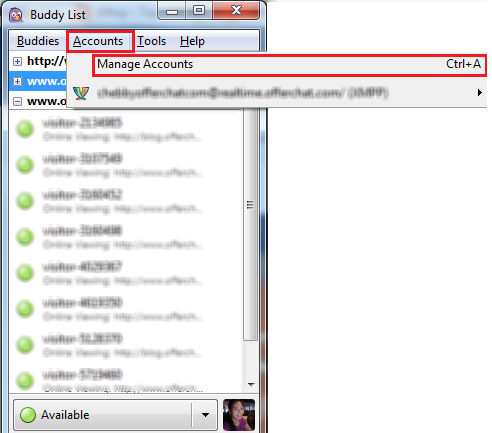
Add account

Step 3

Click the Add button to start integrating your Offerchat account.
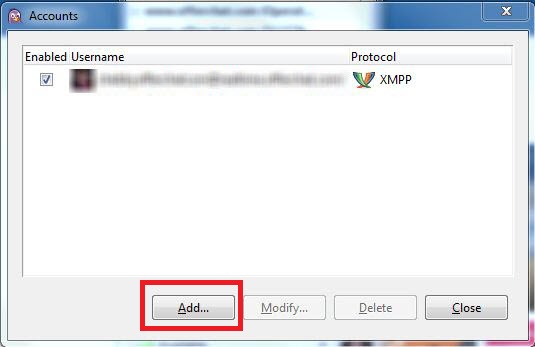
Add Offerchat Live Chat

Step 4

Set the right Protocol by clicking the dropdown menu and selecting XMPP.

Step 5

Fill out your username, domain and password. The username should be the email address you’ve registered for Offerchat without the ampersand (@) and the dot (.) characters, thus, just the letters. Tick “Use this buddy icon for my account” to set a profile picture to appear on the live chat widget on your site. A screen will appear to let you choose a picture from your image files.

Step 6

Click the Advanced button and set Connection security to “Use encryption if available” from the list of dropdown options.

Step 7

Finally, click the Add button.

Congratulations! You have integrated your Offerchat live chat account with Pidgin. You will now be monitoring visitors on your site, receiving and replying to their chats through the Pidgin instant messaging desktop client.

Here’s what it looks like in action:
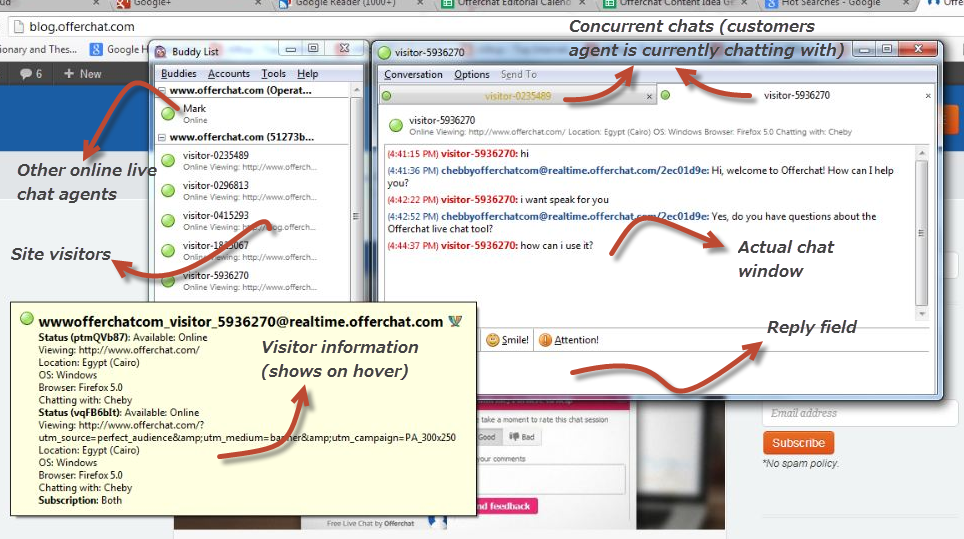
Offerchat live chat Integrated with Pidgin(

(Click the image to enlarge)

Chat with us at the Offerchat homepage or send us a message from the Feedback button on the dashboard if you have questions or need help on integrating your Offerchat live online chat with Pidgin.


Published by

Cheby Labrague
Cheby Labrague

Cheby writes about live chat insights, improving conversions, epic customer service, online marketing and everything in between. She will take you by the hand in exploring how to extend your website's earning power through Offerchat's smart live chat tool, and even smarter live chat people.

Related Posts

If you enjoyed this topic, you might also like:


  • http://www.facebook.com/doktortilki Ibrahim Han Yüksel

    its a great news! thank you for this great service

    • Cheby

      Glad it’s now working on your end. Cheers!

  • http://www.facebook.com/doktortilki Ibrahim Han Yüksel

    its a great news! thank you for this great service

    • Cheby

      Glad it’s working from your end now. Cheers!

  • http://www.facebook.com/doktortilki Ibrahim Han Yüksel

    im doing all this steps. then i get this message with new popup window;

    Plaintext Authentication

    [email protected]/ may require plaintext authentication over an unencrypted connection. Allow this and continue authentication?

    no / yes

    if i choose no; “Server may require plaintext authentication over an unencrypted stream”

    if i choose yes; “Not Authorized”

    • Bagz

      i have same problem

      • Cheby

        It means that the username or password is incorrect, authentication is failing.
        Bagz, are you still having this problem? Please chat with us over at offerchat.com so we can help you get this sorted out

  • http://www.facebook.com/doktortilki Ibrahim Han Yüksel

    im doing all this steps. then i get this message with new popup window;

    Plaintext Authentication

    [email protected]/ may require plaintext authentication over an unencrypted connection. Allow this and continue authentication?

    no / yes

    if i choose no; “Server may require plaintext authentication over an unencrypted stream”

    if i choose yes; “Not Authorized”

    • Bagz

      i have same problem

      • Cheby

        It means that the username or password is incorrect, authentication is failing.
        Bagz, are you still having this problem? Please chat with us over at offerchat.com so we can help you get this sorted out

  • Pingback: Integrate Offerchat Live Support Chat with Pidgin and Chat with Your Customers from a Desktop App | eMarketing Live Chat | Scoop.it

  • Pingback: Integrate Offerchat Live Online Chat with Adium for Mac | Offerchat

  • Mack

    Hello I’m using Trillian - Can u do something like this for me?

    • Cheby

      Hi Mack,

      Sure. I’ll suggest Trillian integration to our developers

  • Mack

    Hello I’m using Trillian - Can u do something like this for me?

    • Cheby

      Hi Mack,

      Sure. I’ll suggest Trillian integration to our developers

  • http://www.brimempresas.com.br Alexandre

    How can I transfer chat to another agent when I using Pidgin with Offerchat?

    • Cheby Labrague

      Hi, Alexandre

      Type the command !transfer on a chat window to transfer that chat to an agent. However, you cannot specify an agent. Pidgin will randomly transfer the chat to agents on queue.

  • erik

    this doesn’t work. not sending messages from the website

  • deepak

    despite lots of RnD pidgin is not working…… can anybody help for the same?

    • Cheby

      Hi, did you make changes to your account lately? Some users have problems with Pidgin connections due to incorrect usernames. Our Support Team can assist you further with this, they’re online at http://www.offerchat.com

      • deepak

        Thanks I have solved it, yes you are right, I was doing mistake with username.

    • deepak

      Now I am seeing error as attached in image. “Server Closed the Connection”

      • Cheby

        Forwarded this image to the devs so they can take a look at your account. Please come chat with us between 11-6 PM (GMT+8) when our devs are also here.

  • deepak

    despite lots of RnD pidgin is not working…… can anybody help for the same?

    • Cheby

      Hi, did you make changes to your account lately? Some users have problems with Pidgin connections due to incorrect usernames. Our Support Team can assist you further with this, they’re online at http://www.offerchat.com

      • deepak

        Thanks I have solved it, yes you are right, I was doing mistake with username.

    • deepak

      Now I am seeing error as attached in image. “Server Closed the Connection”

      • Cheby

        Forwarded this image to the devs so they can take a look at your account. Please come chat with us between 11-6 PM (GMT+8) when our devs are also here.