Live Chat Browser Compatibility Clog with IE and Current Workarounds

Because the Offerchat live chat support tool is completely web-based, the most direct way to access and use it is through a web browser. An email from one of our dear Offerchat users read thus:

“For some reason, I was unsuccessful at making the widget work with IE. Worked fine with Chrome, but what about customers using IE?”

We’ve been receiving many feedback regarding browser compatibility similar to this, and yes, we do feel you. Our developers have been working on finding ways to make the live chat widget work on Internet Explorer. Much of it is finding solutions for a horde of incompatibility issues with this particular browser, especially older versions.

What’s happening:

  • Website owners cannot see the widget on their site after adding Offerchat using Internet Explorer.
  • Website owners cannot access or see the web based chat panel or dashboard after logging in using Internet Explorer.
  • Site visitors, customers, and other people cannot see the live chat widget on the website with Offerchat live chat when browsing said website using Internet Explorer.

Why does the widget work fine on Chrome and Firefox but incompatible with IE?

The Offerchat widget was built with newer technologies in mind. Since Chrome and Firefox are newer browsers and automatically updates (in most cases) to get in line with the latest standards, the live chat widget rarely encounters compatibility issues and, thus, seamlessly works with these browsers.

Actually, the widget works on newer versions of the Internet Explorer browser -- that is, IE9 and up. That’s because these higher versions of IE are built on the current technology, which Offerchat is also based on. On the other hand, Microsoft has stopped support and updates for old IE browser versions. They have been decidedly left behind.

Possible Steps to Circumvent the Issue:

1. Upgrade to a newer IE version.

Check the version of the IE browser on your computer.

Open your IE browser > Click Help up on the menu bar or press Alt H on your keyboard > Choose About Internet Explorer from the menu to see the IE version.

If you see IE 8 or below, you can choose to upgrade your IE browser to a more updated version.

Important!! Please read:

Before you proceed with upgrading your browser, please check what windows OS you’re using. IE 9 is fully optimized for the Windows 7 operating system. That said, IE 9 (and other succeeding higher versions for that matter) does NOT work with Windows XP.

Yes, a lot of people are frustrated but newer IE browsers where the Offerchat live chat widget can actually work is, unfortunately, not suited for XP. Sorry XP users.

“Well, I have Vista…”

Good for you. IE 9 might work (emphasis on might). A couple of caveats:

1) You have to undergo the excruciating required process of installing SP2 for Vista.

2) There are a number of browser features that only work on Windows 7.

Forget about getting IE 10 for your Vista machine too, Microsoft already quipped “not gonna happen”.

To make the long story short, a computer that’s running Windows 7 at the least is needed if you really want to use Internet Explorer for the live chat application.

Not ready to spend $$ for a new machine or OS upgrade?

You don’t have to! Catch simpler workarounds below:

2. Try integrating Offerchat with an instant messaging program. (But you won’t be able to access the dashboard and do admin functions for your account, hence, limited live chat use.)

3. Get a Chrome browser, or get a Firefox browser. These two work with Windows XP, Vista, 7, and the latest Windows 8. No complications, no caveats. Rated best solution as of the moment.

The Offerchat Dev Team is still in the works to successfully make the live chat work on old IE versions. However, we cannot set a definite ETA (estimated time of availability) yet.

In summary:

The Offerchat live chat widget is most compatible with Chrome, Firefox, IE 9 and IE 10 browsers. PC users with Windows XP and Vista machines bundled with older versions of the Internet Explorer browser would have to use Chrome or Firefox in the meantime, or integrate Offerchat with instant messaging programs that can support a Jabber network such as Pidgin.

Published by

Cheby Labrague
Cheby Labrague

Cheby writes about live chat insights, improving conversions, epic customer service, online marketing and everything in between. She will take you by the hand in exploring how to extend your website's earning power through Offerchat's smart live chat tool, and even smarter live chat people.

Related Posts

If you enjoyed this topic, you might also like:


The Minimalist Guide to Developing a Mobile Marketing Strategy for Small Business Ecommerce Sites

Mobile marketing is said to be the next “big thing” expected to be the brightest highlight this 2013. Industry buzzwords related to marketing via the mobile channel have rolled out the tongues of marketing pundits, evangelizers, thought-leaders, and…them folks.

Apple and Samsung waged a legal war amidst continuous intergalactic battles of smartphones and tablets. Android is now the king of the world. The PC has been demoted as an ancient relic, dethroned by mobile devices. More and more people are accessing (and sharing) information on the go and becoming mobile, aptly depicted in this comparison of two Papal conclave scenes:

Papal conclave audience before and now

The singular point I’m trying to make is simple: Consumers have gone mobile. Developing a mobile strategy for your business is a must, else you’ll run the risk of total extinction at the worst and pale sales at the least.

But according to a Forrester report, most marketers are not keen on how to effectively do it. To make your life easier, here’s a minimalist guide to developing an effective mobile marketing strategy for your Ecommerce or small business venture.

Define and know your target audience

Define mobile target audience

OK, so we already know that most consumers are using at least one mobile device - a smartphone or a tablet, or both. There’s a big chance your target market is among them. To get to the core, there are 4 questions you should ask and uncover:

1. Exactly who is your target market/audience?

2. What are the demographics of this group?

3. What are their mobile attitudes and behaviors?

4. What are their needs?

Determining the answers to these questions will help you decide which mobile marketing tactics to use. Always remember that there’s no one-fits-all approach here and every business has its own unique target market. Once you have defined the attitudes and behavior of your target market, you can determine which strategy will engage your audience and get you more sales: a mobile website (easier, cheaper to implement), or your very own app (more complicated, more expensive).

Execute simplicity

Simplicity in mobile marketing

Simplify everything – from support channels down to the very last piece of content. Mobile browsing is a different experience altogether. Smartphones have smaller screens and lower processing power than your laptop, for example.

The mobile experience is all about brevity, simplicity, clarity, speed, target precision, minimalism, ease and convenience. So write brief and concise emails, stick to your purpose and marketing goals, optimize your site for mobile view and clutter-free navigation, and explore mobile chat solutions to communicate directly with your audience even when mobile.

Practice permission marketing

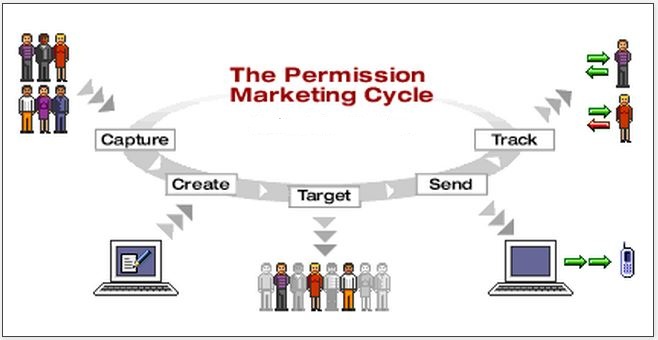
Mobile marketing by permission

Give mobile shoppers the choice to opt-in or opt-out to let them feel in control. Brands that let their target audience hold the reins are respected and trusted, thus, they gain more sales. Some brands make the mistake of forcing an offer to show on a shopper’s phone just because the person is within the proximity. It’s invasive and creeps out customers that inbox spam pales in comparison.

Therefore, make use of location-based marketing and permission marketing only after putting some thought into the relationship between your target market and your business goals.

Flirt with variations

Mobile marketing variations

Never commit the fatal mistake of sticking to one mobile tactic or using mobile marketing as a temporary gimmick. Be comfortable with the fact that going mobile is a long term effort, and strategies should be varied from time to time while still maintaining relevance to your business goals and objective. So if you’re also doing offline marketing, social media marketing, search and local on top of mobile, all messages should be delightfully connected.

It’s important to place a finger on the pulse of your customer base. For a lot of business people, having live chat on their website proved to be very nifty. It provides a direct and instant line of communication between them and visiting consumers without the latter leaving their ecommerce store or website.

Final Words

With the extreme buzz accompanying mobile marketing, it’s easy to lose sight of what’s truly essential and what makes sense. So here’s what I want you to do: Sit down and think what you love most about your smartphone or tablet. How do you use it and what do you use it for? What are the tasks you repeatedly do on this device? What are tasks you’d rather do on some other device? As you live your everyday life, take note of the little details and occasions that make you reach for your phone or tablet. What do you think? Will this exercise help you make the connection to developing an accurate mobile marketing strategy?

Published by

Cheby Labrague
Cheby Labrague

Cheby writes about live chat insights, improving conversions, epic customer service, online marketing and everything in between. She will take you by the hand in exploring how to extend your website's earning power through Offerchat's smart live chat tool, and even smarter live chat people.

Related Posts

If you enjoyed this topic, you might also like:


5 Sure Ways to End Crappy Live Chat Support for Good

In a recent American Express study, consumers ranted how crappy customer service in the web is. This includes, but is not limited to, live chat support. Negative sentiments consumers have about customer support is causing businesses to lose some serious bucks.

Take a closer look at the numbers below:

80% - admit they have quit midway to completing a transaction because of lousy service

89% - admit they move to a competitor after experiencing bad customer service

Consumers have become very sensitive about the customer service experience they get and they have two knee-jerk reactions when dealt with crappy live support: they quit and they go to the next guy who can do better.

It’s time to get serious about ending crappy customer support. If you’re smart, knowing these consumers’ knee-jerk reactions to bad customer service alone will make you realize excellent customer care through live chat support not only retain customers but also attract new ones.

So if right now your customer care quality is less than stellar, here are 5 ways you can end a crappy live chat support without breaking the bank:

Improve your speed

Online shoppers expect to be connected instantly with a live chat agent when they use chat. They also expect agents to respond quickly. Notification alerts play a crucial role in getting an agent’s attention every time a new chat message comes in so that a customer on the other line will not be disappointed. Loud sound alerts and tab notifications are extremely helpful. Make use of Offerchat live chat tool’s IM integration feature if you prefer to have a dedicated program handle chats, separate chat from browsing, and get more conspicuous notification alerts.

Be smarter, show initiative

Live chat features that allow you to be smarter are: the pre-chat form, transfer, and chat history.

The pre-chat form feature allows you to gather information about a customer or site visitor before a chat conversation starts. Make sure you or your live chat agents read what customers log into the pre-chat form.

Most live chat tools, including Offerchat, have a “transfer” feature. When transferring a customer to another agent who can assist him/her better, be sure to brief the agent what the customer wants along with other important details. By doing this, customers won’t have to repeat themselves over again and frustrations are thwarted.

Agents receiving the transfer should read the previous chat logs to get a clear view of what’s going on. Customers will appreciate your asking for a few seconds to skim through the history of the previous conversation than asking them to fill you in. Having customers repeat themselves is a surefire rant starter.

Use saved responses responsibly

Saved responses are of great help to agents but over-reliance on them can be disastrous. As a professional handling live chat customer service, understand that not all customer scenarios are covered in the canned responses. Don’t be lazy to type out a sincere response. And always remember to be clear and concise while you’re at it.

Brief the team on the company’s brand and voice

As the manager or the owner, take the responsibility to orient your team with the company’s brand and voice. Having this exercise puts everyone on board in the same page. Online consumers love consistency; they can get easily confused by mixed messages and generally put off with robotic, dull interactions.

Conduct regular live chat training and mentoring sessions

Most people underestimate live chat thinking they could just hire someone with “superb typing skills” and live happily ever after. It’s a concept that’s greatly flawed in so many ways. Understand that live online chat is a unique form of communication quite different from phone and email. Successfully providing online customers with a satisfying live chat experience lies in the agents’ ability to manage the chat conversation in an efficient and effective way.

Business owners and managers should understand that conducting regular training as well as mentoring and coaching sessions will inculcate skill sets such as asking the right questions and in the right manner. These will define how a consumer perceives the quality of live chat customer service you provide. Part of the advantages of outsourcing live chat agents is the fact that these agent training sessions and quality coaching are done by the outsourcing company making it very convenient for most business owners.

Over to YOU..

What are the live chat support difficulties you’re presently hurdling? How are you overcoming these hurdles?

Published by

Cheby Labrague
Cheby Labrague

Cheby writes about live chat insights, improving conversions, epic customer service, online marketing and everything in between. She will take you by the hand in exploring how to extend your website's earning power through Offerchat's smart live chat tool, and even smarter live chat people.

Related Posts

If you enjoyed this topic, you might also like:


Live Chat Agent Performance: How to be On Top of Your Game

Customer service makes or breaks a business. But in all reality, live chat agents makes or breaks a business because you’re the one who can deliver superior live chat customer service or not. See, there are only two sides of the coin. As a live chat agent, you’ve got to be on top of the game. Whether you are fielding sales questions and support requests from consumers on the other side for your own business or the company you’re working in, the goal is to deliver superior customer service through live chat to win customers on your side.

The Offerchat live chat tool can help you do just that. Here are a few very useful and straightforward tips to help you use the tool as a live chat agent to its full potential and see your agent performance metrics in flying colors.

Get organized

If you think you’re hopeless in this field, think no such thing no more. The Offerchat live chat tool has the necessary features to help you get organized in answering instant chat messages from customers and site visitors. These features ensure you deliver high-quality live support chat by organizing and automating some live chat messages and activities.

Features such as the canned responses not only make chatting more convenient for you, it also organizes common chat scripts. Find yourself typing the same stuff over and over again, why not save the response and make it appear next time by a single click?

Stay focused

Offerchat made it easy for you to stay focused on the job and minimize missed chats. The dashboard is armed with attention-grabbing notification alerts enough to call you to a state of readiness that a customer just walked in your store. When on the dashboard using your browser, a clear, solid sound is heard every time you’re looking at a different window and a new message comes in. It is accompanied by text flashing “New Message” on your browser tab where the dashboard is currently opened.

For a more focused chat experience complete with customized sounds and other desktop notifications, try integrating Offerchat with a third party IM client like Pidgin and Adium for Mac. (More IM client integrations coming soon)

Take the lead and pin the sale

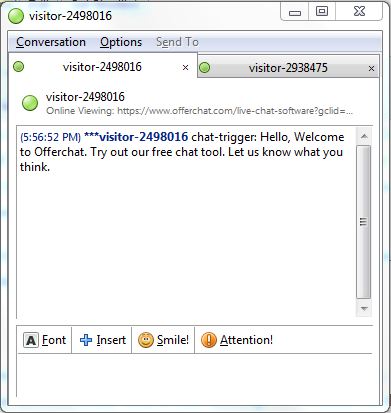
One can never make the mistake on taking the initiative, especially when done in the right direction. The Offerchat live chat allows admins and account owners to set proactive chat triggers that automatically send a chat message to a visitor on the site based on pre-mediated conditions. You, the chat agent, on the other hand, will be able to see these proactive chat messages on your screen tagged to the visitor it was sent to. Now you’ll know where to pick up on the conversation when the visitor replies to this proactive chat.

Of course, it appears when you’ve integrated your agent account with an IM desktop client too.

Proactive chat on Pidgin

The chat on the Pidgin screen above is the proactive chat message sent to a visitor after a pre-set chat trigger activated it. Pretty neat, eh?

Published by

Cheby Labrague
Cheby Labrague

Cheby writes about live chat insights, improving conversions, epic customer service, online marketing and everything in between. She will take you by the hand in exploring how to extend your website's earning power through Offerchat's smart live chat tool, and even smarter live chat people.

Related Posts

If you enjoyed this topic, you might also like:

Adding a Post Chat Survey After Every Live Online Chat Session to Measure Customer Service Quality

Monitoring and measuring certain aspects of your online business and marketing are essential to determine the success of your ecommerce initiatives or if you’re able to meet company goals. If you have a live chat widget added to your website or ecommerce store as a touch point and customer service tool, monitoring and measuring the quality of your live chat customer service and capturing accurately the customer service experience on your live chat investment is now possible by enabling the Post Chat Survey from the Offerchat dashboard.

What is a Post Chat Survey?
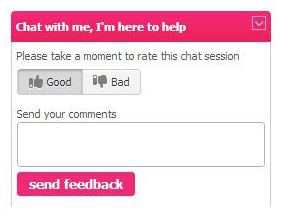
A post chat survey is a dialog box that will appear to your website visitors and customers who have just finished a live support chat session with you or one of your customer service staff (live chat agent). It allows website visitors and customers to rate the live online chat they’ve just experience and allows them to put their comments regarding the person they have chatted with and the live chat customer service experience as a whole.

Offerchat Live Chat Post Chat Survey

How to Activate the Post Chat Survey

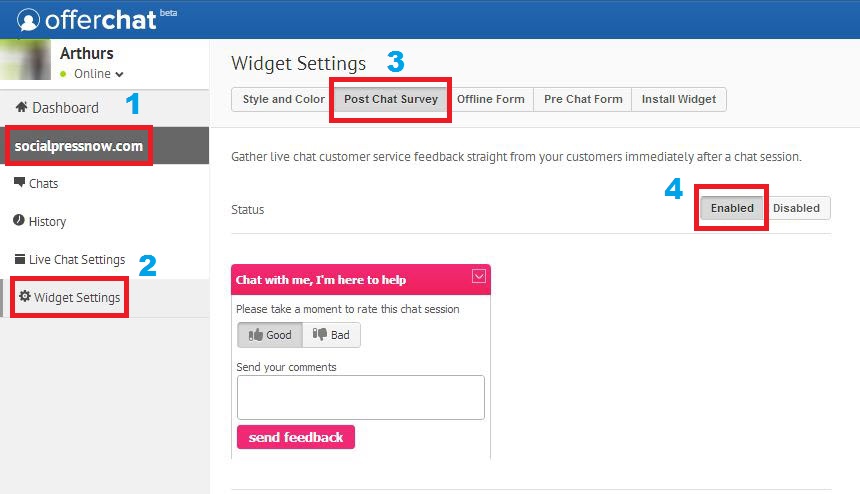
Important: Activating the post chat survey from the dashboard needs administrator/account owner access. To enter the Offerchat dashboard and make crucial changes, log in with your email address and password for your Offerchat account. Once inside the dashboard, follow the steps below:

Step 1
Click a website under your profile. Choose the website where you’d want to have the Post Chat Survey activated.

Step 2
Go to Widget Settings

Step 3
Click the Post Chat Survey tab at the top.

Step 4
Click the Enabled button to activate the post chat survey to appear after every chat conversation ends.

Enable the Post Chat Survey for Customer Service

The Post Chat Survey is now activated!

A preview of the dialog box for the Post Chat Survey is displayed in the screen. The color of the box reflects the color of the live chat widget on your website. This will be the Post Chat Survey box your customers will see at the culmination of each chat session. From here on, you’ll be able to gauge customers experience and also gauge your customer service staff’s performance. You’ll see a collated report on this from the Offerchat dashboard.

If you need additional help in activating the post chat survey on your Offerchat live chat widget, or if you have questions with anything, come chat with us at the Offerchat homepage or send us a message using the Feedback button from the dashboard.


Published by

Cheby Labrague
Cheby Labrague

Cheby writes about live chat insights, improving conversions, epic customer service, online marketing and everything in between. She will take you by the hand in exploring how to extend your website's earning power through Offerchat's smart live chat tool, and even smarter live chat people.

Related Posts

If you enjoyed this topic, you might also like:


How to Get the Most Out of Offerchat Live Chat Customer Service

Offerchat is the only free premium live chat tool in the market. No shit holier than that. There’s no need to undergo a free trial, no need to fear for the sands of time to run out, and no need to unlock premium, exclusive features with your earned gold points.

Kiss free trials goodbye... Offerchat is 100% free.

Now just because the live chat customer service tool is free doesn’t mean you can prance around and go your merry way. After all, customer service is a serious endeavor, back-breaking even. But the thing is, you already have the tool to succeed in customer service, give your customers plenty to rave about and love you, and earn their lifetime loyalty. Live chat customer service should be easy.

Here are 5 tips on how to get the most out of Offerchat live chat:

1. Don’t forget to verify the live chat widget.

Very Important Update: To make adding live chat to your site a lot easier, we decided to scrap the manual verification process. From now on, new users will have a single forward flow in embedding the widget. Once the code is successfully saved on your site’s HTML, just refresh the page to load the Offerchat live chat widget on your site! No more going back to hit the “Verify” button.

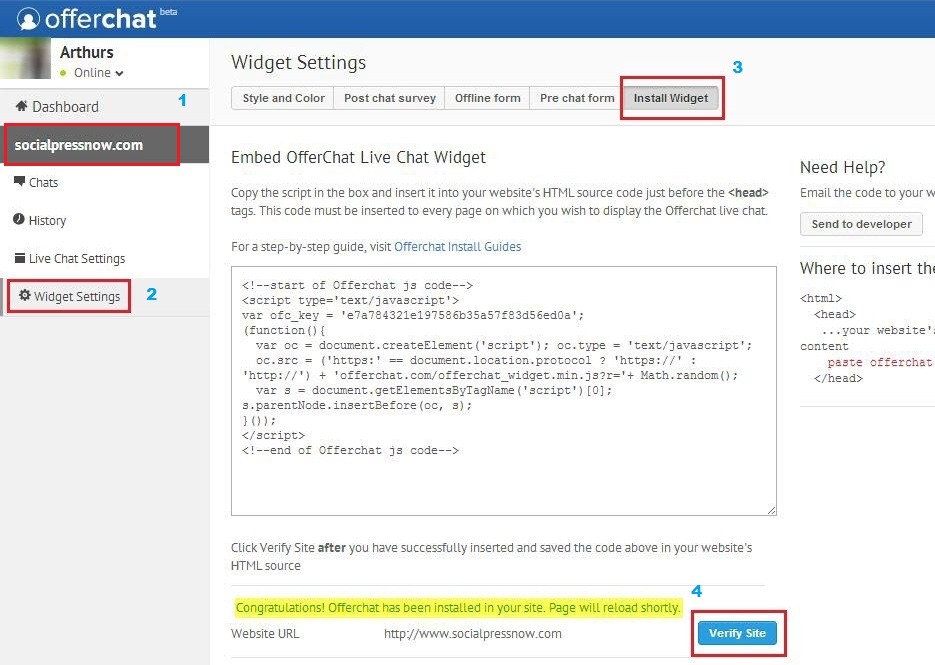
Verifying the live chat widget is like touching base with us so that you avoid any technical problems later. When you verify the live chat widget on your site, you are ordering our servers to detect the live chat on your website. Once our servers are able to detect the Offerchat live chat app you’ve added on your site, communication flows smoothly. To verify your widget log in to the Offerchat dashboard, click your website on your left and go to Widget Settings then to Install Widget. Click the Verify Site button.

How to Verify Live Chat Widget

2. Add a profile photo.
Displaying a profile picture to attach a face next to a name really does wonders when it comes to humanizing customer experience. As with any kind of online communication, chat and instant messaging pales in comparison with real face-to-face conversation. Were it not for its inherent convenience, none of us would be communicating online. Adding a professional yet smiling profile photo eradicates the rigid and impersonal gap between two people communicating online while fostering customer trust and confidence in your business.

3. Set proactive chat triggers.
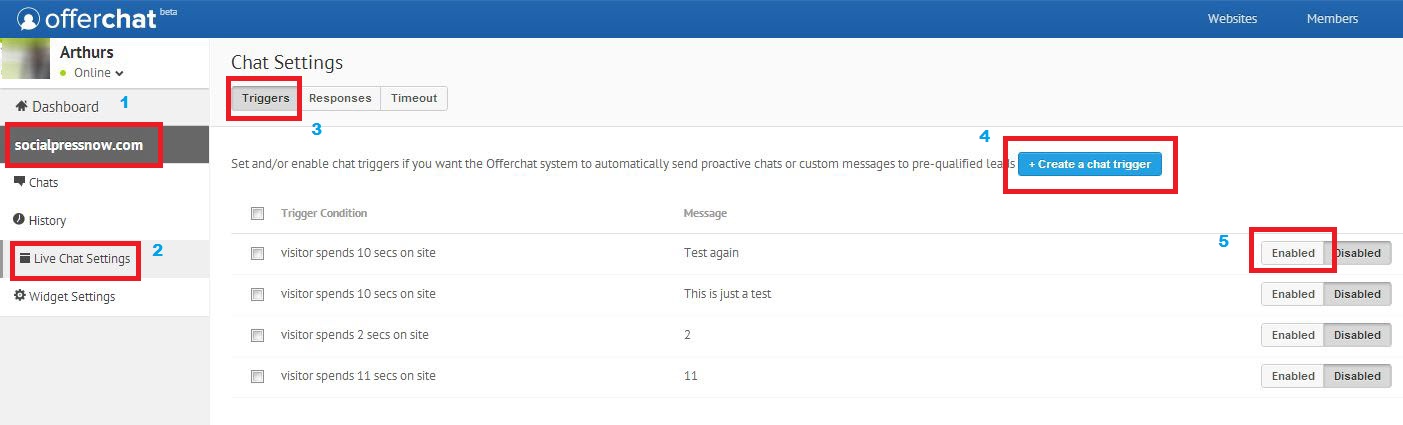
Targeted proactive chat initiatives are very beneficial to making and saving sales. If you’re running an ecommerce website or any online business, you might want to consider setting up a proactive chat program. According to a Forrester research, 51% of online shoppers appreciate proactive chat invitations because it allows them to multitask, and 29% like it because they are in control of the conversation and they can skip straight to the information most relevant to them. One of the leading insurance and financial services in the US reported getting back 30%-40% of their clients who have abandoned shopping carts after implementing proactive chats. You can activate targeted proactive chat invitations and create triggers by logging into the Offerchat dashboard and going to Live Chat Settings through a website listed on your left.

How to Add Proactive Chat Triggers

4. Make use of Saved Responses.
Saved or “canned” responses allows you and your live chat agents to save time and make the live chat session with a site visitor more convenient. By saving answers to FAQs into this live chat feature along with common greetings and closing messages, you can just click to chat a sentence instead of typing them out. To add or edit saved responses, log into your Offerchat dashboard, click on a website you’re working on, go to Live Chat Settings and click Responses. Sweet because you can also add and save proactive chat messages here.

As you can see, there is a proactive chat message initiative in this list of saved responses on the dashboard. Click to chat by just clicking a response you want and it will automatically fill out the reply box when you’re on a chat session with a site visitor or a customer.

5. Outsource your live chat agent needs to professionals.

Live chat outsourcing
Live chat outsourcing is now available in flexible and reasonably priced packages at Offerchat. Instead of fielding all customer questions by yourself or with your small team, you can outsource them to live chat customer service experts like us. You’ll be able to pick and customize services according to your business needs, thus paying only for what you need. The most important element here is the “onboarding session” where we sit with us to specify deliverables, schedules, expectations and other details to make sure we’re in the same page. Our live chat outsourcing services is how we do business to generate money and revenue; the live chat tool is forever free for you to use so go ahead and make the most out of it.

Cheers!

Published by

Cheby Labrague
Cheby Labrague

Cheby writes about live chat insights, improving conversions, epic customer service, online marketing and everything in between. She will take you by the hand in exploring how to extend your website's earning power through Offerchat's smart live chat tool, and even smarter live chat people.

Related Posts

If you enjoyed this topic, you might also like:

Shopify Ecommerce: 3 Customer Service Mistakes You’re Unwittingly Doing in Your Shopify Store Everyday

Shopify store owners are tremendously raking in unprecedented earnings. Through the internet, entrepreneurs can market their products worldwide. If you’re an avid online merchant, producer of novel goods, expert artisan of any industry, or somebody with products to showcase and sell online, one of the most popular showrooms in the internet is Shopify - a web-based e-commerce platform that allows businesses to create an online store.

Just with any type of business, excellent customer service is imperative in a Shopify e-commerce site to gain the most sales. If you’re Shopify store is experiencing humdrum sales & conversions for some time now, you might be committing these 3 customer service blunders without knowing it.

Duplicating Web Presence for Mobile

Do you have mobile offerings to attract buyers? The similarity they have with your social media marketing campaigns and even on your Shopify store determines the success rate of conversions and sales.

Shopify-mobile-offering

While in the past, the experience and value offered to consumers tend to be the same across all platforms – Shopify store, social media pages, mobile apps or pages – more and more business owners are uncovering the fact that altering the value a customer gets in one platform and making the offerings unique from its web presence (website and social media pages), get them more raves and, consequently, more sales. So don’t duplicate your web presence in your mobile offerings. Add an additional perk for consumers who found you through mobile or are using mobile to purchase goods and create a whole new customer experience for them.

Yes, you can definitely do this whilst still being consistent across all marketing platforms you’ve chosen. Consistency and uniformity (tedious lack of variety), after all, are two different things. Think gamification and make your mobile offering more fun.

Having Multiple Customer Service Channels

Having a multi-channel customer support wasn’t considered bad – not until they’ve turned into communication silos that are isolated and closed, completely disconnected from each other.

multi-channel-customer-service

Maybe you’ve seen it lots of times: a customer tweets to a brand for assistance, posts a message on its Facebook page, emails with details about the purchase, and, after getting no response just decided to call the customer support number only to repeat the details why he/she needs assistance all over again. Yes, it’s frustrating and definitely a huge dent in customer experience.

Customers are increasingly expecting support to be agile rather than be multi-channeled. They expect being able to start interaction in one touchpoint and still be able to complete it in another in the name of convenience. This calls for smarter strategies with a standardized resolution process, efficient retrieval and use of data given by the customer, and consistency throughout all customer service channels.

The new mantra is: Less is More.

Lack of an Easy Customer Support Channel

Everybody loves convenience. It’s one of the steadfast pillars of customer experience.

Everything you’ve done in your Shopify store – the theme, the layout, the design, the presentation of product photos, writing of product descriptions, discounts and promos – all have one goal in mind: to make your Shopify ecommerce site provide the best customer experience possible. It’s not even just to sell anymore!

Convenience is closely tied with customer experience. By making your customers’ lives easier while they’re on your Shopify store, you’re winning them over to your side. Checkout optimization, alternative payments, product detail page enhancements , and most especially, easy access to customer service as just some of the areas businesses are making improvements on.

Does a customer need to find a “Contact us” link to fill out a form for an inquiry? Does he or she have to set a time to make a call to ask assistance? Or exit out your Shopify store just to tweet you if the item is available in mauve? Why not add a live chat widget so they can directly contact you and get the help they needed right away without leaving the page they’re currently in? They might just be on the checkout page. You wouldn’t want them closing that page just to answer their “quick question”.


Published by

Cheby Labrague
Cheby Labrague

Cheby writes about live chat insights, improving conversions, epic customer service, online marketing and everything in between. She will take you by the hand in exploring how to extend your website's earning power through Offerchat's smart live chat tool, and even smarter live chat people.

Related Posts

If you enjoyed this topic, you might also like: